Welcome, Guest
Username: Password: Remember me
Discussions for CodeTyphon Studio Installation and Setup.
  • Page:
  • 1

TOPIC:

Preserving settings from the previous version when updating 2 weeks 6 days ago #19350

  • Roman
  • Roman's Avatar Topic Author
  • Offline
  • Junior Member
  • Junior Member
  • Posts: 122
  • Thank you received: 0
I believe this issue has been raised before, but I'll reiterate: when will the IDE's main appearance settings (color theme, editor font, window placement, etc.) be preserved when updating the CT version? As far as I understand, this can be accomplished by literally changing a couple of lines of the installation script (avoid deleting files in the settings directory), and this will almost always work (unless the configuration file format is drastically changed).

Please Log in or Create an account to join the conversation.

Preserving settings from the previous version when updating 2 weeks 6 days ago #19353

  • Matis A.
  • Matis A.'s Avatar
  • Away
  • Moderator
  • Moderator
  • Posts: 1342
  • Thank you received: 210
We can't provide a total solution.
Every new CT release has new Settings Elements
PilotLogic Core Programmer

Please Log in or Create an account to join the conversation.

Last edit: by Matis A..

Preserving settings from the previous version when updating 2 weeks 6 days ago #19354

  • W. Peterson
  • W. Peterson 's Avatar
  • Offline
  • New Member
  • New Member
  • Posts: 19
  • Thank you received: 0
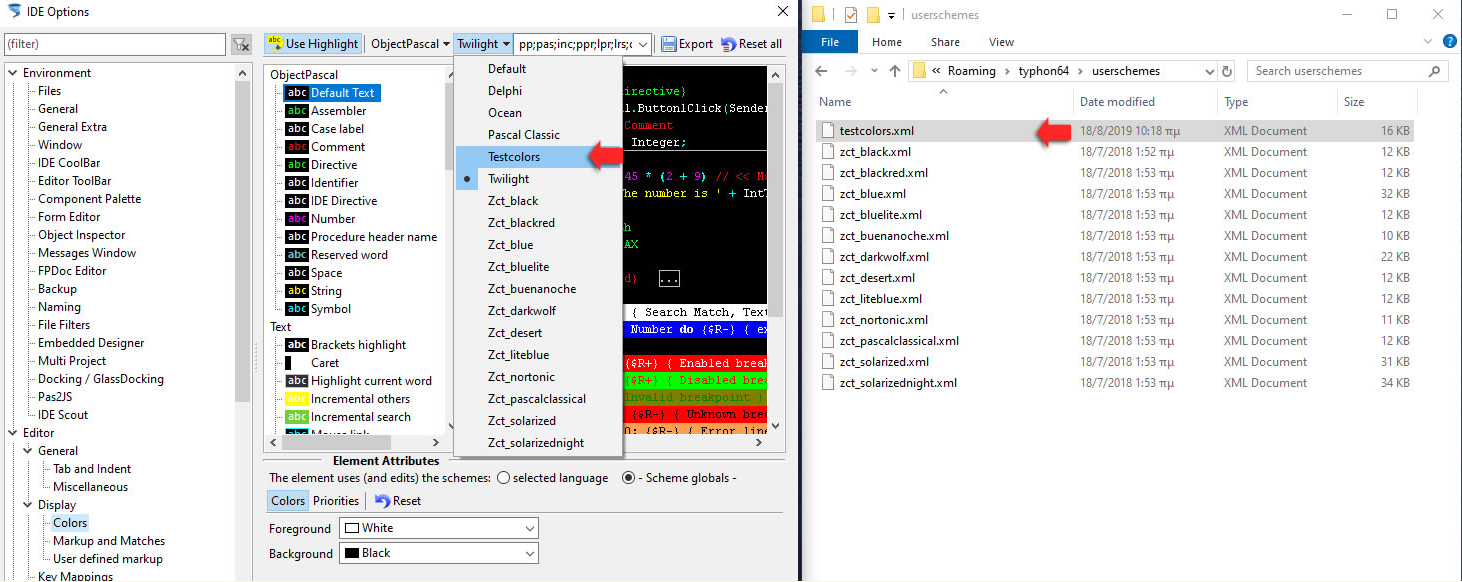
I haven't had to restore my colors for a while now, but these are the notes I made.  You have to have saved your colors into a file before hand, of course:

Restore colors in Codetyphon:
1) Put your new "color file (mine is named C:\CodeTyphonProjects\testcolors.xml)" at:

C:\Users\myusername\AppData\Roaming\typhon32\userschemes\testcolors.xml
or
C:\Users\myusername\AppData\Roaming\typhon64\userschemes\testcolors.xml

Folders

2) Close Typhon IDE and Reopen the IDE (or Typhon IDE Menu => File=> Restart)
Typhon read all "color files" list from above folder at IDE start up.

3) Go to IDE Settings Option=>Display=>Colors>Third tab over>Select testcolors.xml
and select you new "color file"

Image attached:
Attachments:

Please Log in or Create an account to join the conversation.

Last edit: by W. Peterson .

Preserving settings from the previous version when updating 2 weeks 6 days ago #19355

  • Vbxler
  • Vbxler's Avatar
  • Offline
  • Junior Member
  • Junior Member
  • Posts: 75
  • Thank you received: 5
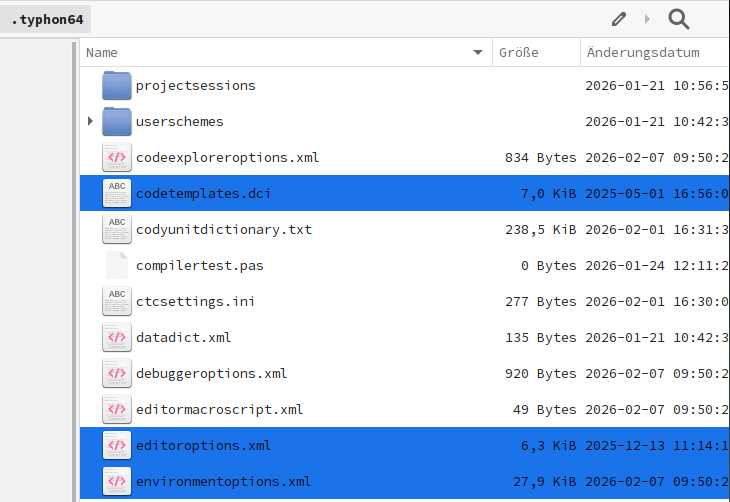
When I install a new version of Typhoon, I do it like this:
1) I'm saving these three files in the image.
2) I'm installing the new version of Typhoon.
3) I start Typhoon and set up the docking windows.
4) I close Typhoon and copy the three previously backed-up files back to their original positions.

After that, everything works as before.
Warning: Backup files from Linux cannot be used on Windows! And vice versa.
 
Attachments:

Please Log in or Create an account to join the conversation.

Preserving settings from the previous version when updating 2 weeks 6 days ago #19358

  • W. Peterson
  • W. Peterson 's Avatar
  • Offline
  • New Member
  • New Member
  • Posts: 19
  • Thank you received: 0
I just installed the latest Codetyphon, moved in my unique exported colors file (testcolors.xml) to C:\Users\User\AppData\Roaming\typhon64\userschemes\, restarted Codetyphon and the colors were available to load in.

Please Log in or Create an account to join the conversation.

Last edit: by W. Peterson .

Preserving settings from the previous version when updating 2 weeks 5 days ago #19359

  • Roman
  • Roman's Avatar Topic Author
  • Offline
  • Junior Member
  • Junior Member
  • Posts: 122
  • Thank you received: 0

Every new CT release has new Settings Elements

I don't see a problem with this: reading the old settings file should proceed without issue, and saving it later will update it with the new settings. The values ​​of the added settings elements in the new version are not found in the old file and receive default values. However, if an old setting element is excluded in the new version (unlikely), then reading it in the new version will throw an exception. This exception simply needs to be handled so that reading the settings file continues—and then, as before, saving the settings in the new version will update the file, after which there will be no more exceptions.

I just installed the latest Codetyphon, moved in my unique exported colors file (testcolors.xml) to C:\Users\User\AppData\Roaming\typhon64\userschemes\, restarted Codetyphon and the colors were available to load in.

Besides the color theme, I also customize a lot of other settings, from debugger options to code folding, and so on.

General note: if it's relatively easy to manually transfer settings using files, why not do it automatically using scripts?

Please Log in or Create an account to join the conversation.

Last edit: by Roman.

Preserving settings from the previous version when updating 2 weeks 5 days ago #19361

  • W. Peterson
  • W. Peterson 's Avatar
  • Offline
  • New Member
  • New Member
  • Posts: 19
  • Thank you received: 0
Just for a bit of information, a few years ago I tried to copy my color settings into an upgraded version of CodeTyphon, but the old color file wouldn't work.  I noticed that yesterday when I copied all my old backed up color setting files into my new CodeTyphon, that two of the very old files would not show up.

Please Log in or Create an account to join the conversation.

  • Page:
  • 1